Showing posts with label Updates. Show all posts

Sunday, 8 December 2013

November sofware update


A first attempt at a web browser is available under Program only for wired ethernet network connections that support DHCP; not wireless at the moment. Please note the browser is currently limited, it does not supprt HTTPS.
The AirPlay streaming is fixed for iOS 7 devices.
The classic Confluence skin (blue) is back.

Update 11/12/13
Interesting date sequence!
Why have you changed the skin back to Confluence (blue)?  The previous skin (red) is no longer being maintained.  There will be a major update to XBMC next year (called Gotham) that Confluence (blue) will work with.

Tuesday, 5 November 2013

October Software Update


Yes it is November and things are a tad late because more testing was needed!

To get the update, all you need to do is reboot your OpenView.

Be VERY patient if you see the file root system being patched, this could take 30 minutes!

No new major features but a lot of improvements.

If you’ve experienced a slow down with this update, just reboot your Raspberry Pi twice and you’ll be back to normal speed!

Tuesday, 1 October 2013

September Software Update

Yes, it is October 1st today and here is the September software update!


This is a big one. Some of you may have got part of the update earlier last week and seen a ‘Service management’ or root filesystem update. That was done to prepare your systems for this update well in advance.

To get the update, simply reboot.  You might not be updated immediately because the server gets over loaded at this time and only updates when it has enough power!  If you do not get updated then leave it a few days and simply reboot again.

There will be a number of blue screens and a few automatic reboots during the update process.


Sit back, relax and be patient whilst the system updates.

After the update you can view your "Operating system" software date, it will read "Mon Sep 30".


Thursday, 26 September 2013

Patching root filesystem

When you power up you may see a message saying "Patching root filesystem".  The message sits there on your TV screen for quite a while, do not power down OpenView, be patient and wait. After several minutes OpenView will be up and running.

Blue screens mean major software is being updated or fixed, this normally takes place toward the end of each month.

Friday, 23 August 2013

August Software Update

Another month and another software update!  July software update was rock solid.

To get the update, simply reboot. Note that if you have disabled updates via Raspbmc Settings, you’ll need to enable them first.  You might not be updated immediately because the server gets over loaded at this time and only updates when it has enough power!  If you do not get updated then leave it a few days and simply reboot again.

Sit back, relax and be patient whilst the system updates.

Sunday, 11 August 2013

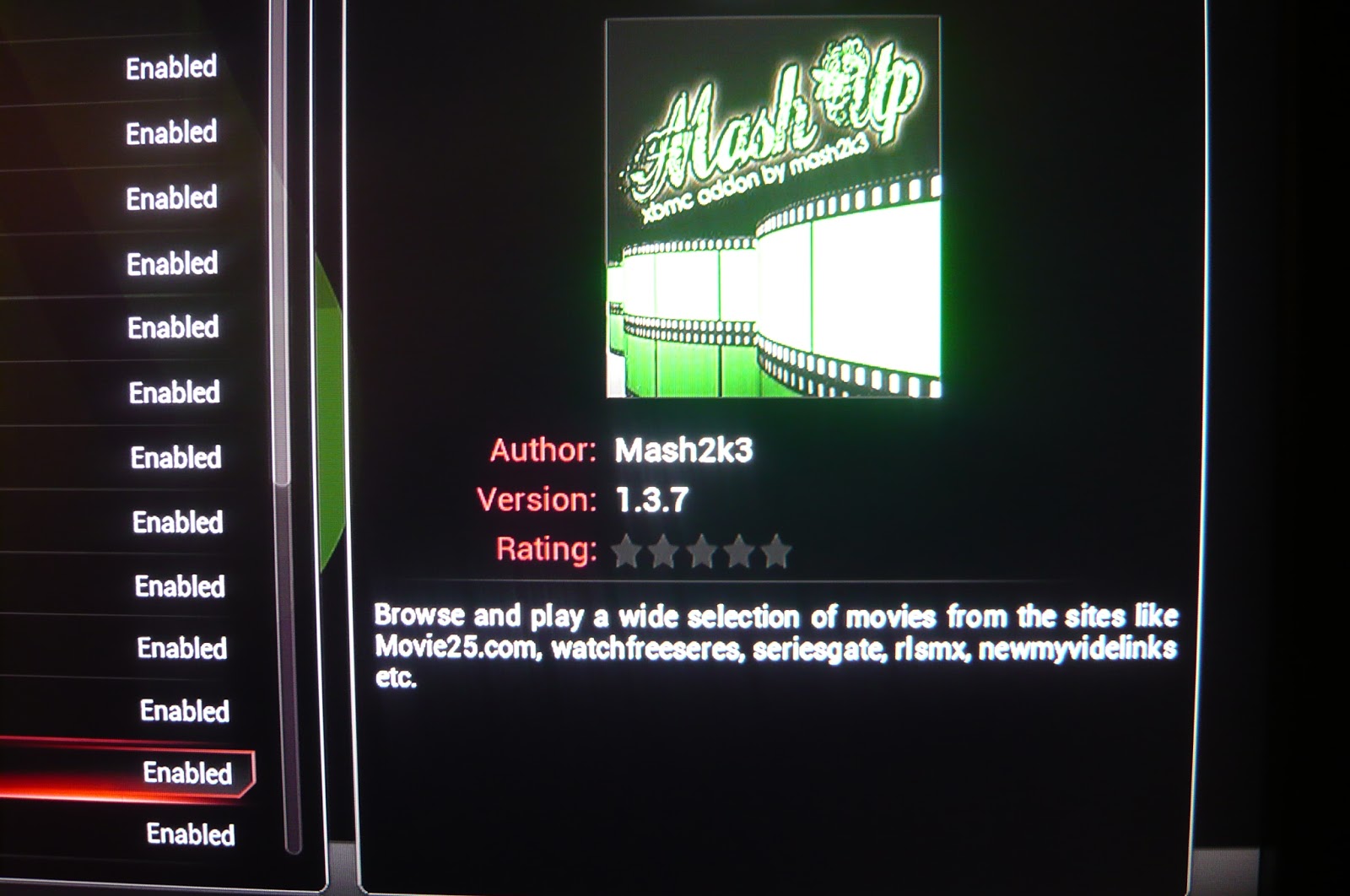
Updating Mash Up to version 1.3.7

The Mash Up update to v 1.3.7 has to be done manually.  If you have any problems then use the comment box below and we will get back to you.  This can be a bit tricky!

You may see this


Click OK and select SYSTEM-Settings from the Home screen


Select Add-ons


Select Get Add-ons for our installed software repositories


Highlight (but do not Select, i.e. do not click) All Addons by Mash2K3, this is the software repository for the Mash Up add-on


Select the context menu whilst "All Addons by Mash2K3" is highlighted.  To select the context menu press "c" if you are using a wireless or USB keyboard.  If you are using an android device with Yatse then select the "square" icon next to your "i" (information) icon (which is next to your power button". Select "Force refresh" on the context menu.


Use the back button to move back up the menu and select Enabled Add-ons


select Video Add-ons


You may see the Mash Up downloading depending on how quick the download happens.  Sometimes you may see "update", just wait for the automatic download.


When the download has completed you will see the new version 1.3.7 displayed when you highlight "Mash Up"


Reboot


After reboot you may see some other notifications to do with other things.  Just click "OK" to the notifications.  Select Mash Up from the Home screen.  You will see a screen like this, click "OK".


Once you have selected Mash Up from the Home screen you will be presented with a list view screen by default.  You may wish to change this for a thumbnail view.


A thumbnail view by activating the hidden left menu and highlighting "View", then select "Thumbnail"


Saturday, 10 August 2013

Mash Up Force Refresh

Sometimes we may need to Force Refresh OpenView to get our latest software updates.  Select SYSTEM Settings


Select Add-ons


Select Get Add-ons


Select All Addons by Mash2K3


Select the "context" menu; "c" on a locally connected keyboard or square icon next to to "i" icon on Yatse. Then select "Force Refresh"


This will update your Mash2K3 software repository (MashUp).

Tuesday, 30 July 2013

July Software Update


The next time you power cycle OpenView you should automatically get updated with a new Linux kernel and XBMC build. The main purpose is a few improvements and bug fixes.

Sit back, relax and be patient whilst the system updates.

The Raspbmc Updater sequence is automatic and goes something like this:

Downloading Kernel Binaries
Downloading Kernel Headers
Extracting Kernel Modules
Auto reboot
Patching root filesystem
Auto reboot
Updating service management
Downloading new XBMC
Auto reboot
Good to go!


Reference only:

Linux 3.6.11 #2 PREEMPT Tue Jul 30 02:02:22 UTC 2013 arm6l
xbmc 12.2 Git-20130502-32b1a5e


Monday, 17 June 2013

Software Update

When you power cycle your OpenView you should soon get a software update. This will be automatic and will take about 10 minutes, you will see the progress on your TV screen.

During this process do not turn the system off.  First the Linux operating system is updated then XBMC is updated.  You will see several blue screens displaying information and the system will reboot itself a few times.


After the software update your screen will look like this, this is the new "Raspbmc Confluence Mod" skin.


If you want to change back to the original skin then under SYSTEM-Settings-Appearnce-Skin,


 select the "Confluence" skin